

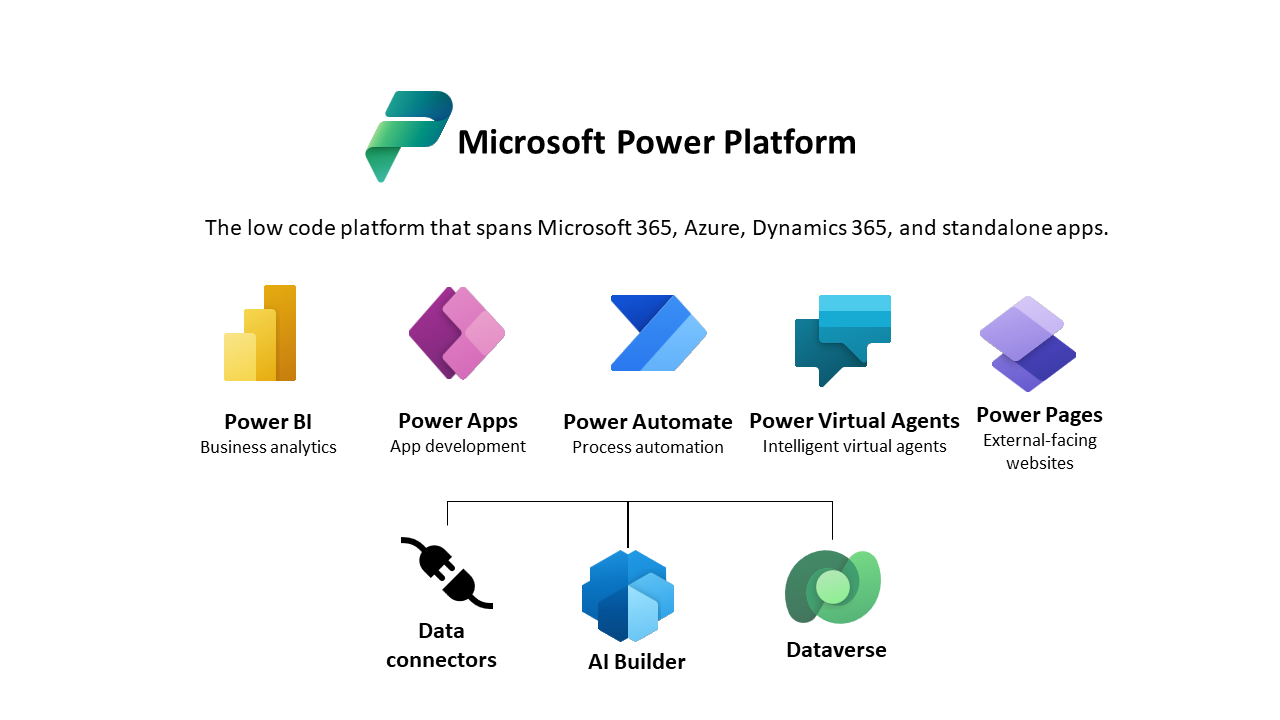



Power Platform

Unlocking Your Technological Future with Low-Code End-to-End Solutions.

What is Power Platform

Are you ready to supercharge your organization’s digital transformation journey? Embrace the limitless possibilities of Microsoft Power Platform today and unlock a world of innovation, efficiency, and growth. Discover how you can empower your team to build custom apps, automate processes, and gain invaluable insights from your data – all without the need for extensive coding. Take the first step towards a brighter and more efficient future for your business. Your organization’s digital evolution begins now.

Let’s Explore the Fundamental Elements of the Microsoft Power Platform

Power Apps

Build custom applications effortlessly using the Power Apps platform. Whether on a browser or mobile, these applications cater to diverse needs, from data collection to complex workflow.

Key Features

  • Develop mobile-optimized applications with low-code expertise required.

  • Seamlessly link and present data from enterprise applications like Dynamics 365 and Office 365.

  • Intuitively present essential data in an app, simplifying the data entry process.

Power Automate

Microsoft Power Automate, formerly known as Microsoft Flow, is a cloud-based service that allows users to create automated workflows between various applications and services. These workflows help to synchronize files, collect data, get notifications, and perform numerous repetitive tasks efficiently without manual intervention.

Key Features

  1. Automated Workflows: Automate repetitive tasks and processes, freeing up time for more critical activities.
  2. Integration with Multiple Services: Connects with over 300 data sources, including Microsoft Office 365, SharePoint, Dynamics 365, SQL Server, and many third-party services like Google Drive, Dropbox, Twitter, and more.
  3. Templates and Connectors: Offers a wide range of pre-built templates and connectors to quickly set up common automation scenarios.
  4. AI Builder: Incorporate AI capabilities into workflows to enhance automation with features like form processing, object detection, and text recognition.
  5. Robotic Process Automation (RPA): Power Automate’s UI flows allow for the automation of legacy applications that do not have APIs by mimicking user interactions.

Power Pages

Microsoft Power Pages is a secure, enterprise-grade, low-code platform for building, hosting, and administering modern, data-driven business websites. Part of the Microsoft Power Platform, Power Pages allows users to create and customize responsive websites that integrate seamlessly with Microsoft Dataverse and other Microsoft 365 services.

Key Features

  1. Low-Code Development: Create and design websites with minimal coding using an intuitive drag-and-drop interface, pre-built templates, and customizable components.
  2. Integration with Microsoft Dataverse: Seamlessly connect websites to Dataverse, allowing for dynamic data management and interactions.
  3. Responsive Design: Build websites that automatically adjust and provide optimal viewing experiences across a wide range of devices, including desktops, tablets, and mobile phones.
  4. Security and Compliance: Benefit from enterprise-grade security features, including role-based access controls, authentication, and data protection compliant with global standards.

AI Builder

Microsoft AI Builder is a low-code platform within the Microsoft Power Platform that allows users to add artificial intelligence (AI) capabilities to their applications and workflows. AI Builder provides pre-built and customizable AI models that enable businesses to automate tasks, gain insights from data, and improve decision-making processes without needing extensive knowledge in AI or data science.

Key Features

  1. Pre-Built AI Models: Offers ready-to-use AI models for common business scenarios such as form processing, object detection, text recognition, and sentiment analysis.
  2. Customizable Models: Allows users to train custom AI models tailored to their specific business needs using their own data.
  3. Seamless Integration: Easily integrates with Power Apps and Power Automate, enabling users to incorporate AI capabilities into their applications and workflows.
  4. Low-Code Development: Provides a user-friendly, drag-and-drop interface that makes it accessible for users without extensive technical skills.

Co-Pilot Studio

Microsoft Co-pilot Studio is a powerful feature within the Microsoft Power Platform designed to enhance the development experience by providing intelligent, AI-driven assistance. Leveraging advanced natural language processing and machine learning models, Co-pilot Studio aids users in building, customizing, and optimizing applications and workflows with greater efficiency and accuracy.

Key Features

  1. AI-Powered Assistance: Provides real-time suggestions and guidance during app and workflow development, reducing the need for deep technical expertise.
  2. Natural Language Processing: Allows users to describe their requirements in natural language, and Co-pilot Studio translates these descriptions into functional app components or workflow steps.
  3. Code Generation: Automatically generates code snippets, expressions, and formulas based on user input, speeding up the development process.
  4. Customization and Optimization: Offers recommendations for optimizing app performance and enhancing user experience based on best practices and AI insights.

Process to Get Started with Power Platform

Artboard 69

Collaborate

We work with you to find the pain points and the strengths of your current system.

Implement

We will handle the import and execution of the necessary updates for your current Power Platform use cases.

Prosper

We will provide training to your designated team, ensuring they attain expert-level proficiency.

Why Choose Microsoft Power Platform?

Low-Code, High Impact

Empower your team to build powerful apps and automate processes with minimal coding. Unleash your creativity and innovation without being tied down by technical constraints.

Seamless Integration

Seamlessly connect with your existing Microsoft tools, including Microsoft 365, Dynamics 365, and Azure, for a unified, efficient, and connected ecosystem.

Data-Driven Decision Making

Avoid expensive errors like isolated architecture, inadequate data policy implementation, and incorrect solution deployment methods.

Rapid ROI

Reduce development time and costs, boost productivity, and accelerate your ROI. Power Platform is designed to deliver quick wins and long-term value.

Scalability

Grow with confidence. Power Platform scales with your business, ensuring that as your needs evolve, so does your technology.

Ready To Transform Your Business

Don’t wait to embark on your digital transformation journey. Join the countless organizations already experiencing the benefits of Microsoft Power Platform. Discover how you can streamline operations, increase agility, and drive innovation. Take the first step towards a brighter future – one where your organization thrives in a rapidly changing digital landscape.

Get started today! Our experts are here to guide you through the process. Let’s unlock the full potential of your business together.

Frequently Asked Questions

What is Microsoft Power Platform and what are its main components?

Microsoft Power Platform is a suite of applications, connectors, and data platforms that provides a low-code development environment for building apps, automating workflows, analyzing data, and creating virtual agents. The main components of Power Platform are:

  • Power BI: For data visualization and business intelligence.
  • Power Apps: For building custom applications.
  • Power Automate: For automating workflows and processes.
  • Power Virtual Agents: For creating intelligent chatbots.
How can using Microsoft Power Platform benefit my business?

Microsoft Power Platform offers several benefits for businesses, including:

  • Increased Productivity: Automate repetitive tasks and streamline processes to save time.
  • Data-Driven Decisions: Gain insights from your data with powerful analytics and visualizations.
  • Custom Solutions: Build tailored applications that meet specific business needs without extensive coding.
  • Integration: Seamlessly integrate with other Microsoft services (e.g., Office 365, Azure) and third-party applications.
  • Scalability: Easily scale solutions as your business grows.
Do I need to have coding experience to use Microsoft Power Platform?

No, you do not need extensive coding experience to use Microsoft Power Platform. The platform is designed to be user-friendly and accessible to users with varying technical skills. Power Apps and Power Automate, for example, provide low-code and no-code environments with drag-and-drop interfaces. However, for more complex requirements, having some basic understanding of coding and scripting can be beneficial.

What types of data sources can I connect to Microsoft Power Platform?

Microsoft Power Platform supports a wide range of data sources. You can connect to various data sources including:

  • Microsoft Dataverse: The underlying data platform for Power Platform.
  • Cloud Services: SharePoint, OneDrive, Azure SQL Database, Dynamics 365.
  • Third-Party Services: Salesforce, Google Drive, Dropbox, Twitter.
  • On-Premises Data: SQL Server, Oracle databases, and other on-premises systems using data gateways.
  • Custom Connectors: Create custom connectors for other data sources not natively supported.
How secure is Microsoft Power Platform?

Microsoft Power Platform is built on Microsoft’s secure cloud infrastructure, ensuring high levels of security and compliance. Key security features include:

  • Data Encryption: Data is encrypted at rest and in transit.
  • Access Control: Role-based access control (RBAC) to manage user permissions.
  • Compliance: Meets various industry standards and regulations, such as GDPR, HIPAA, and ISO certifications.
  • Auditing and Monitoring: Comprehensive auditing and monitoring capabilities to track user activities and data access.
  • Identity Management: Integration with Azure Active Directory for robust identity and access management.
What is the Microsoft Power Platform?

The Microsoft Power Platform is a suite of tools—Power BI, Power Apps, Power Automate, and Power Virtual Agents—that enables users to analyze data, build solutions, automate processes, and create chatbots.

Why should you implement Power Platform to supercharge your Business?

Power Platform is a suite of low-code tools from Microsoft that includes Power BI, Power Apps, Power Automate, and Power Virtual Agents. These tools help businesses create custom applications, automate workflows, analyze data, and build chatbots with minimal coding.

Benefits for Your Business:

  1. Enhanced Productivity: Automate routine tasks and processes, freeing up time for more critical work.
  2. Improved Data Insights: Use Power BI to visualize data, generate reports, and make data-driven decisions.
  3. Custom Solutions: Develop tailored apps with Power Apps to meet your specific business needs without extensive programming.
  4. Seamless Integration: Integrate with other Microsoft services and third-party applications, ensuring smooth workflows.
  5. Cost Efficiency: Reduce the need for extensive development resources, saving time and money.
  6. Scalability: Easily scale solutions as your business grows, ensuring long-term adaptability.

Implementing Power Platform can streamline your operations, improve decision-making, and boost overall efficiency.

Who can use the Power Platform?

The Power Platform is designed for both technical and non-technical users, allowing anyone from business analysts to IT professionals to create solutions that improve business processes.

Is the Power Platform integrated with other Microsoft services?

Yes, the Power Platform seamlessly integrates with other Microsoft services such as Office 365, Dynamics 365, Azure, and various third-party applications.

What is Power BI?

Power BI is a business analytics service that provides interactive visualizations and business intelligence capabilities with an interface simple enough for end users to create their own reports and dashboards.

Can Power BI handle real-time data?

Yes, Power BI supports real-time data streaming and can display real-time dashboards for continuous monitoring.

What is Power Automate?

Power Automate (formerly Microsoft Flow) is a service that helps you create automated workflows between your apps and services to synchronize files, get notifications, collect data, and more.

Can Power Automate be used for complex workflows?

Yes, Power Automate supports complex workflows with conditions, loops, and approvals, making it suitable for advanced automation scenarios.

What is Power Virtual Agents?

Power Virtual Agents enables you to create powerful chatbots that can answer questions posed by your customers, other employees, or visitors to your website or service.

Do I need to be a developer to create chatbots with Power Virtual Agents?

No, Power Virtual Agents provides a no-code interface to create and manage chatbots.

How does the Power Platform handle data security?

The Power Platform adheres to Microsoft’s security, privacy, and compliance standards, including data encryption, role-based access control, and compliance with industry standards such as GDPR.

Can I integrate Power Platform with non-Microsoft services?

Yes, the Power Platform supports integration with a wide range of third-party services through built-in connectors and custom APIs.

What are the licensing options for Power Platform?

Licensing options vary for each component of the Power Platform. Microsoft offers both per-user and per-app plans. Please reach out to us at licensing@radindynamics.com and our licensing team can address your Qs and provide you the latest pricing information.

Is there a free trial available for Power Platform?

Yes, Microsoft typically offers free trials for Power BI, Power Apps, and Power Automate. Please reach out to us at sales@radindynamics.com and our Sales Team will set you up for a full feature trial to explore the capabilities before committing to a subscription.

See What our Customers Say About Us

SARAH KNOX VP, Implementation at RADIX HEALTH

I have had the opportunity to work with Shivprasad on several complex software implementation projects. On each project, Shivprasad not only delivered on time, but went above and beyond to ensure quality standards and provide exceptional post-launch support. His attention to detail and ability to anticipate issues before they come to fruition are incredibly valuable. It is truly a pleasure to work with him, due to both his high quality of product and pleasant demeanor.

MARK HOWIE SENIOR BUSINESS INTELLIGENCE LEAD, TUTOR PERINI CORPORATION

Shiv Kotagal worked as a consultant for our company. Having worked extensively with him on a weekly basis, I can assure you that he is confident and competent in the field of Dynamics 365. His insights and ethic are impeccable. It was an honor to work with him and recommend him to you in any capacity.

Mitchell Hatch Collaborative Marketing and Brand Strategist

Shiv is very knowledgeable and reliable. The best part of working with Shiv, though, is his positive attitude and fun personality.

Necati Ercan Ozgencil Dynamics 365 Technical Lead

Shiv is not only a very talented and smart engineer, but also a very good team player. He loves innovation and to learn new technologies. He is the master of the MS-CRM system in our group. I enjoy working with him, and always learn something new while discussing with him.

Craig Wantuch Vice President IT Infrastructure Services at Precisely

Shiv was always a pleasure to work with. He was the "go to" person whenever problems occurred with our IT Software. Shiv was knowledgeable and helpful, always maintaining an optimistic attitude despite challenging circumstances. He swiftly integrated new technologies into his core skill set. Shiv was an asset to our organization and sure to be a key player wherever he goes.

Mike Galan Director of Financial Systems at Pape-Dawson Engineers

As a Business Applications Manager at Corgan, I had the privilege of working closely with Shiv during our CRM implementation. Shiv is very knowledgeable about Dynamics CRM and was the primary point of contact for his organization. Shiv demonstrates strong customer support skills and a willingness to please his clients while balancing project scope. My experiences with Shiv are positive and I look forward to working with him again on future CRM projects.

Steve Horn Director of Business Systems/Applications, HME - California, USA

I can't say enough about the excellent work that Radin has done with our Dynamics CRM platform. They were brought in to take over and fix the mess left by our previous partner. With their knowledge and expertise of CRM, they were able to come in and immediately take what was a completely non-functional platform and transformed it into an appealing, easy to use system for our Sales, Marketing and Service teams. It was an absolute pleasure to work with them. There were minor problems along the way; these were sorted out quickly and efficiently. We are looking forward to working with them on future projects. Anyone seeking a reference can reach out to me anytime. We would recommend using Radin to anyone looking for quality services, delivered in a professional manner.